


-
FunFacts
Features a widget that slides through fun facts to add some interesting tidbits to your homepage.

Drag & Drop Designs
-
WooCommerce Features
Set up an ecommerce store using Woffice extranet add-ons with custom post types & subscriptions.
-
Header and Menus
Inbuilt header and menu options with Revolution Slider compatibility.
-
Colors and Typography
Use unlimited colors and fonts, including Google Fonts, to customize and fit your brand's needs.

-
Layouts
Manage community websites with versatile layouts (blogs, product posts, single pages).
-
Icons & Megamenus
Features mobile-friendly mega menus and icons for better UX and boost conversions.
-
Unlimited Sidebars
Sidebars with enhanced UI/UX to creatively display supplementary information.

Manage Events and Schedules
Workplace scheduling is easier with Woffice calendar and scheduling tools.
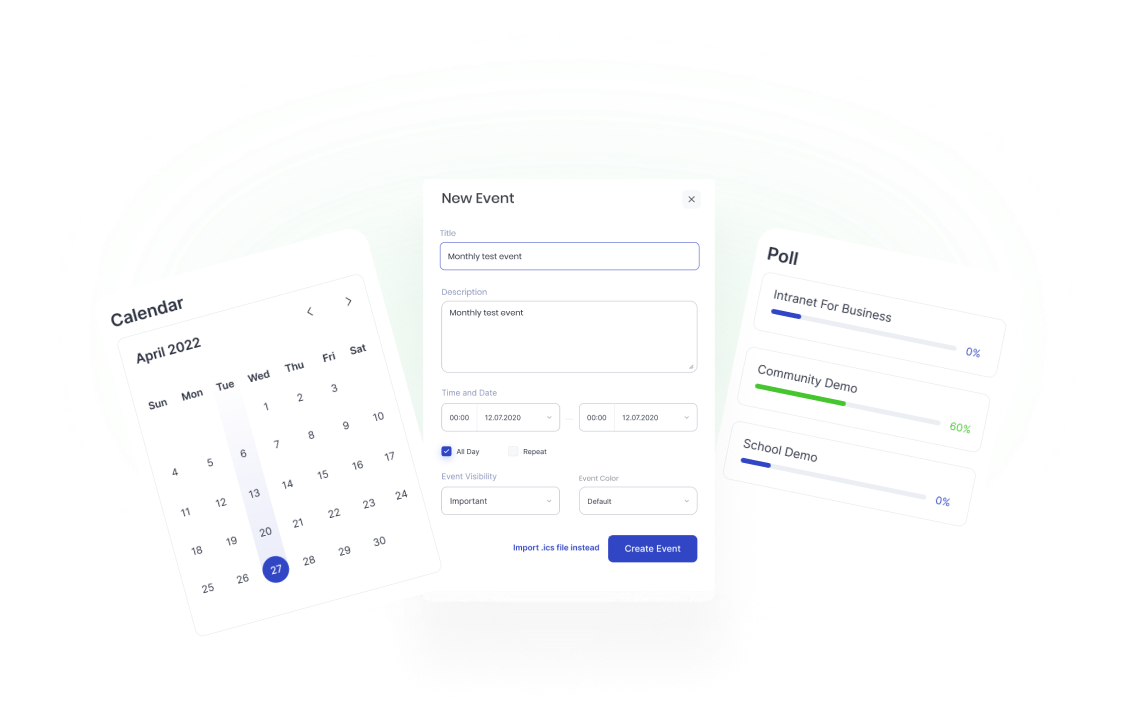
Be on top of your schedules and tasks by using Woffice’s built-in calendar management features. It enables you to manage events, team schedules, webinars, meetings and important tasks without hassle or switching between multiple apps.
Peak Workplace Productivity
People spend less time coordinating teams and switching between apps, and more time focusing on cognitively demanding tasks.
Woffice’s calendar tool lowers friction by synchronizing teams through built-in productivity layers. It helps improve real-time collaboration and reinforce time management with enhanced calendar views, all without leaving your WordPress intranet.
Shared Team Calendar
Event Creation and Customization
Widgets and Integrations
Task and Project Linkage
Reminders and Notifications
RSVP Management
Social Sharing
Deadline Management
Login & Registration

Login Page
Develop a secure and customizable login page for each member of your community.

Google Signup
Woffice seamlessly integrates with the Google Signup feature for convenient user registration.

Facebook Signup
Access to easy user registration with Woffice Facebook Signup feature integration.
How to Create a Custom Login Page
A custom login page is one of the exclusive features in Woffice, which offers and allows WordPress sites to replace the default WordPress login screen with an interactive interface that reflects your organization’s identity. It is most commonly used in intranet systems, membership portals, and private business communities built with Woffice.
- 1Step 1
Install and activate the Woffice theme and all dependent plugins
- 2Step 2
Create a new WordPress page and assign the Login page template
- 3Step 3
Publish the page
- 4Step 4
Navigate to Appearance → Theme Settings → Login/Register
- 5Step 5
Toggle Custom Login Page to Yes
- 6Step 6
Select your preferred login layout and configure branding options (logo, background, colors)
- 7Step 7
Set your after-login redirect URL, welcome message, and security options
- 8Step 8
Click Save Changes and test your login URL
Login Page Customization Options
Woffice also offers you lots of other customization options for your login page, including a custom layout and background image.
Directory Builder Features
Find the right person or resource with Woffice’s directory customization options, including custom fields, searchable listings, and filters. Users can add as many fields as needed to meet business requirements to organize information and display with icons for easy access.

- No-code Management
- Smart Team Directory
- Advanced Search and Filters
- Built-in Shortcodes
- Dynamic Field Builder
- Frontend Directory Control
- Icon Customization
- Visual Listing Cards
Hierarchical Knowledge Base Organization
Woffice’s knowledge base creation feature is scalable and suitable for distinct use cases, including schools and educational portals, membership communities, companies, non-profits, and more. Its knowledge management tool offers flexible access control options and powerful collaboration features, such as private messaging, a file manager, activity streams, document sharing, timelines, and more.
-

Google Docs to WIKI addon
Create a WIKI with Google docs for your members via our premium addon Docs to WIKI.
-

Extended Search
Upgrade search capabilities with advanced queries and forms for WIKI. Connect your docs.
-

Extended Categories
Define multiple categories and subcategories for a navigational and responsive WIKI knowledge base.
-

Multi-Language Ready
Woffice supports WPML and RTL, making your content accessible and searchable in 15+ languages.

OpenAI Fully Integrated

Blog Content
Woffice stands out by using generative AI to streamline content creation from the start.

Blog Images
Generate AI custom images seamless for your blog posts with Woffice OpenAI integration.

To Do
Reduce projects' clutter to manage projects effectively and easily with AI-generated to-do lists.

Project Titles
AI-powered unique and interesting project titles awaiting your touch.Try it out today!

Project Description
Catchy and tailored project descriptions for your team's specific needs and understanding.

Secure Workspace
Woffice’s built-in security features are designed for companies, especially creative agencies to ensure smooth and secure organizational operations. Its robust security provides access control without complicated setup, helping you create a user-friendly interface to privatize your entire network. Manage user activities across projects by assigning specific roles from the front-end and keeping unauthorized visitors out.


Woffice FAQs
Does Woffice allow custom employee sign ups and log in authentication?
Woffice supports integration with Google and Facebook signup features. This allows employees to sign up seamlessly to the company’s intranet. You can also create a customizable login page for your intranet members to log in securely into their accounts. Learn more about login customization.
Why would you use a custom login page for your company members?
Creating a custom login page for your intranet has a number of benefits. A well-designed login page inspires a sense of security to your users. It puts their mind at rest knowing that their login details are well secured. In fact, using a separate login page makes it difficult for a user with a malicious motive to gain access. Lastly, a custom login page makes your organization come off as more professional, both in the eyes of internal employees and external entities that might have access to your portal (extranet).
How Woffice executes OKRs framework?
Woffice brings your team, projects, communication, and knowledge into one centralized workspace, and that’s where the Woffice OKR Add-on comes in. It’s designed to execute OKR based project management directly inside your intranet.
Is blocking wp-admin enough to fully restrict dashboard access?
No. The REST API is a separate access point that’s often overlooked. Even with wp-admin locked down by role, unauthenticated or unauthorized users may still be able to reach the same data through REST endpoints unless you add a dedicated authentication check.
How does the Woffice calendar feature help in team productivity?
Woffice’s calendar tool helps and boosts team productivity through its built-in productivity enhancing features, which help set clearer priorities, reduce missed deadlines, minimize coordination efforts and lower administrative overhead. Teams can utilize their team more appropriately and get work done faster without missing tasks’ due dates or meetings, rather than wasting time switching back and forth between multiple apps.





Join us today to SAVE HUGE!!
Get alerts of discounts and coupons on Woffice products, and early access to our new launches, upcoming sales information and updates.